

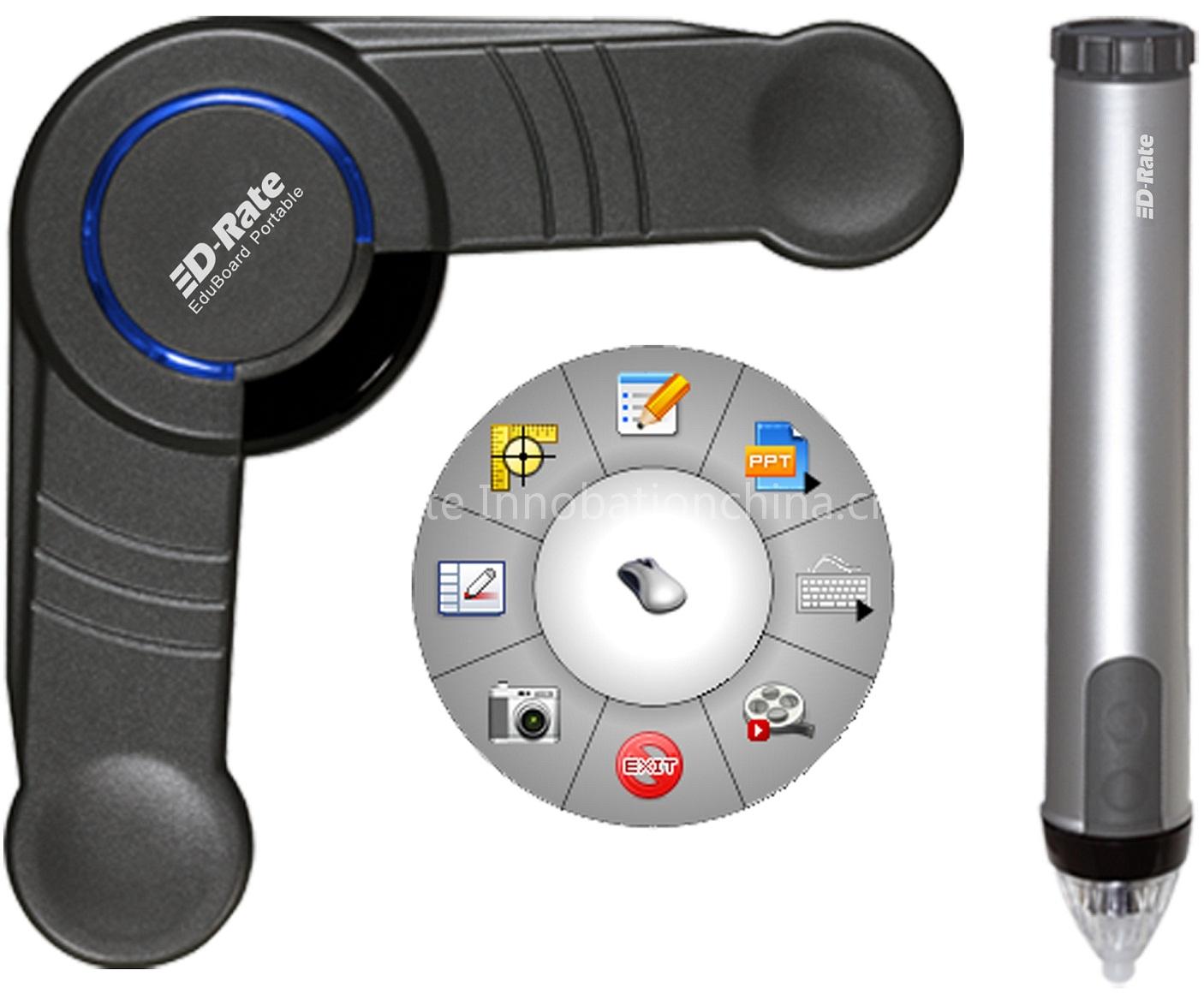
portable interactive whiteboard
Specifications
- Origin
- China
- Price Term
- FOB
portable interactive whiteboard is a School & Office Supplies product. Key specs — Origin: China; Price Term: FOB.
Product Description
Highlights:
♦Cost-effective
Full function interactive whiteboard, has high capability with lower cost.
♦High compatibility
Can compatible with existing teaching and office resource such as projector, curtain, blackboard and popular teaching software etc.
♦Reliable
Greater accuracy, higher resolution, lower latency and refraction, larger working space enabled by break-through Unified- Infra technology.
♦Convenient installation
The 90°L-shaped corner designed and only 3 cm width arms, ensures the receiver can be fully embedded in all the borders.
♦Work easy
With simple setting, everyone can obtain the operation freely in 1 minute, just like use the mouse.
♦High technology
With the 4th generation wireless positioning technology, EduBoard products don’t rely on any specialized board for interacting.
♦Low maintenance cost
High-integration, reliable, convenient installation and easy usage result in a low maintenance cost.
♦Low-cost inputs
High compatibility with existing teaching resource, avoid waste equipment, Low-cost inputs than traditional interactive whiteboard.
Features:
♦Flexible
Convert any existing resource such as a whiteboard, a wall, a rear projection (DLP), plasma (PDP), a LCD flat panel display, or a table into and interactive whiteboard with free size from 20 inch to 110 inch.
♦Portable
Pocket size, smart and light weight benefit express shipment, fast delivery, convenience (carry and share an interactive whiteboard wherever you go), economical usage (share among multiple classrooms), prompt after-sales service etc.
♦Efficient use
The innovative tool palettes can be show and hidden and follows users, a full function stylus with a left and right click, make the operation more convenient. All the teachers can give a vivid lesson without moving back and forth in front of board.
♦4 teaching modes
EduBoard software supports 4 typical teaching modes: the mouse and desktop annotation modes enable a teacher to control and annotate on any application and interactive teaching software (such as audio, video, web, Geometer's Sketchpad) from board; PPT/Presentation Mode is integrated with Power-point application; Blackboard Writing Mode creates a virtual blackboard on which a teacher can write with the interactive stylus same as he/she write on the traditional blackboard with chalk.
♦On-Screen Keyboard
Selecting On-Screen Keyboard opens the Windows On-Screen Keyboard that you can use to enter text by tapping keys with the Interactive Stylus. Click again for closing. Handwriting Recognition is used to convert Interactive Stylus annotations into text that can be used in Text Boxes and dialog boxes. Click again for closing.
♦Screen Capture
As a default, the captured image is saved as a background into a new Page in Scrapbook. When you select the Full Screen Capture, an archive dialog box will display for hinting you whether to save. You can save whole of the page as *.JPG, *.JPEG, *.BMP, *.PNG,*.GIF format.
♦Powerful software Tools
Other software tools which facilitate classroom teaching are focusing/highlight tools, input tools (soft keyboard, handwriting), capture and record tools (save as image/picture or video clips with a format of AVI etc), and on-line sharing using MS NetMeeting or Live Meeting. Teaching resource and reference lesson material are included as well.
♦Four Application Scenarios
Four application scenarios have been widely adopted in real classrooms over the world.
a) Attach a white magnetic projection curtain on the conventional blackboard/green-board, and create an interactive whiteboard on conventional blackboard by attaching EduBoard receiver at the corner of blackboard;
b) Put EduBoard receiver on the corner of DLP projection TV and convert DLP into a interactive whiteboard;
c) Assemble an integrated interactive whiteboard by embedding a receiver in the board frame,
d) Attach the receiver on the low gloss porcelain enamel whiteboard.
Related Products
 IWB---A big interactive whiteboard manufacture from China
 67" electromagnetic whiteboards
 A big interactive whitebaord manufacture from China
 electromagnetic whiteboard
 40" electromagnetic intellignet whiteboard
 A big manufacture of interactive whitebaord
 finger touch whiteboard with large screen size
 IWB---Interactive whiteboard--educational equipment