Refurbished Gaggia Platinum Swing Up Espresso Machine
Specifications
- Brand
- Gaggia
- Origin
- Italy
- Packaging
- Wooden Pack
- Price Term
- FOB
- Payment Term
- T/T,PAyPal,Western Union
- Delivery Time
- 10 Days
- Loading Ports
- Soekarno-Hatta International Airport
Refurbished Gaggia Platinum Swing Up Espresso Machine is a Other Home Appliances product. Key specs — Brand: Gaggia; Origin: Italy; Packaging: Wooden Pack; Price Term: FOB.
Product Description
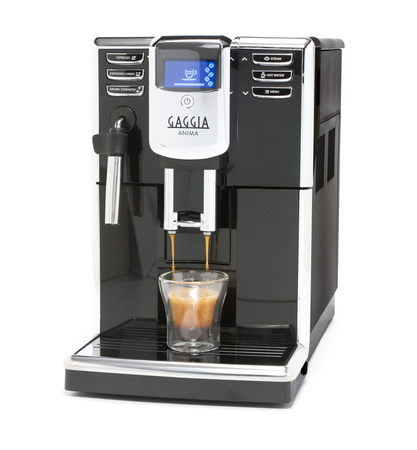
Gaggia’s focus on innovation optimizes the machine’s simplicity, ease of use, and most importantly, the quality of each shot of espresso. The Gaggia Platinum Swing Up is characterized by a user-friendly interface – a circular dial in the center works similar to an iPod click wheel, allowing you to swing your finger to select the function.
Above this touch ring dial is the 24-character LCD screen, which shows your beverage options and programming choices.
Beneath the exterior lies the heavy-duty stainless steel Rapid Steam boiler system, which allows you to switch between brewing and steaming and back without the down time normally associated with warming up and cooling down.
With the Rapid Steam boiler system and Gaggia Milk Island , you’re sure to have any of a menu of drinks – café americano, latte, espresso, café crema, cappuccino, café breve – whenever you want it, and how many you want. A Rapid Steam boiler system is what truly elevates the Gaggia Platinum Swing Up into the realm of high-class espresso machine.
Features & Benefits: Coffee
Click-Wheel Programming
The backlit touch ring is the center of the programming menu, and at its center is the confirmation button, signified by an icon of a coffee cup. Above the wheel is a digital LCD screen, which works to guide you through programming and functions.
To the left of the wheel are two backlit buttons – the top one has the letter M above a down arrow, and brings you to the menu. The bottom button has a coffee bean icon, and is for changing the coffee dosage from 7-10.5 grams, as well as for using the bypass doser. To the right of the wheel are another two buttons.
The top one shows a burst of steam and is for the steam wand, and the bottom one has a droplet of water as an icon and dispenses hot water.
Menu Options
Entering into the menu allows you to customize each of your beverages. You can set your preferences for the quantity of coffee to be brewed, coffee temperature, and pre-infusion in the “beverage settings†sub-menu.
The “machine settings†sub-menu allows you to change or adjust the language, water hardness, acoustic alarms, filter alerts, rinsing, cup-warming surface, and clock settings.
The other sub-menus – maintenance, energy savings, and special functions – allow for descaling, water filter adjustments, washing the brew group, entering into standby mode, and returning all functions to their factory settings.