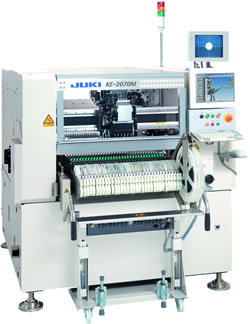
JUKI JX-200 SMT part
Specifications
- Origin
- china
- Price Term
- EX-Work
- Payment Term
- T/T
JUKI JX-200 SMT part is a Electronics Production Machinery product. Key specs — Origin: china; Price Term: EX-Work; Payment Term: T/T.
Product Description
4.5.2 Printing Pressure Teaching Flow ← Created on PT. Inputting the print conditions data Printing pressure teaching ← Adjusted automatically. Teaching is complete. 1E3C-E-OMB04-A02-00 Page 4-23 4.5 Printing Pressure Teaching 4.5.3 Teaching Procedure UNLOCK 1. Press + [Pressure]. . This step uses the screen of SP80V for description. .
The squeegee head opens at its origin position, and the message urging you to set the jig appears. SERVO 2. Turn OFF the servo switch. OFF ( ) ON ( ) 3. Open the front safety cover. To the next page Page 4-24 1E3C-E-OMB04-A02-00 4.5 Printing Pressure Teaching . The above picture indicates the state that the squeegees and the jig are set.
1D3C-059P SERVO ) ON ( ) OFF ( To the next page 4 Make sure that the squeegee c is set. 5 Set the teaching jig d to F-side. . Push it in until you hear a click. Teaching jig setting position 6. Connect the connector of the teaching jig to the one for the F side. . Lock it using the hand screw. 7 Close the front safety cover.
8 Turn ON the servo switch. UNLOCK 9 Press + [Yes]. . The squeegee head closes, and the message urging you to execute the teaching again. 1E3C-E-OMB04-A02-00 Page 4-25 4.5 Printing Pressure Teaching UNLOCK 10. Press + [Yes]. .
The message that shows the printing pressure teaching is being executed appears, and the printing pressure teaching starts at the F side. UNLOCK . When you press